UNMSM Web SQL Injection Attacks
Sunday, February 13, 2011
Example Church Welcome Letter
Web SQL Injection Attacks [Part II]
Web SQL Injection Attacks [Party III]
Now that we know what is a SQLi we continue to detect this vulnerability in a website.
SQLi 5 Searching vulnerabilities.
SQLi Earlier we saw that one occurs when the web application form SQL queries by concatenating parameters, we send you, without validating properly. To these parameters we will call the web application inputs. The first step to detect a SQLi will identify all the inputs it receives the application. To do remember that tickets are sent using GET and POST methods of HTTP. See more details these methods.
The GET method is commonly used for any resource request via HTTP. If you want to send parameters using this method, they will in the URL after the question mark "?" and therefore are visible and easy to change from your browser.
:
localhost User-Agent: Mozilla/5.0 (Ubuntu 10.10) Accept: text / html
This is a HTTP request example using the GET method to request the resource / test / index.php page = parameter passing news and id = 1. You can also see the Host header, User-Agent and Accept that provide additional information on the application. 
POST / test / index.php HTTP/1.1 Host :  localhost User-Agent: Mozilla/5.0 (Ubuntu 10.10) Accept: text / html
Content-Type: application / x-www-form-urlencoded  localhost User-Agent: Mozilla/5.0 (Ubuntu 10.10) Accept: text / html
 Content-Length: 14
page = news & id = 1 The example shows an HTTP POST request that sends data to / test / index.php. The data goes to the bottom. In the headers we see the Content-Type specifies that in this case we are sending a form and the Content-Length indicates the number of characters of data sent. After the headers is a blank line as a separation and ultimately we want to send data.
addition to the parameters sent by GET or POST, other areas that can be used to inject SQL code are some headers like: Cookie, User-Agent, Referer, or Host. The HTTP headers provide additional information on the application, go to one per line and have the form "Header: value." For example, the Cookie header is used to identify the user's session, some web applications store their value in the database, along with other data in the session, and then use it to retrieve data. There could therefore be vulnerable to SQL injection. User-Agent header to the server tells your browser and operating system, Referer indicates the URL of the page you were viewing when making the request and Host, domain name web site requested. All these data could be used for statistical purposes and its value to be stored in a database. Therefore we must also consider in our analysis. ZAP
5.1, a tool for automated detection.
5.1, a tool for automated detection.
Well now we know the areas we can use to test a SQLi, the next step is to modify the values \u200b\u200bof the data sent seeking to generate an error or figure out if we can change the SQL query. We are going to use a tool called Proxy Attack Zed (ZAP) which can be downloaded from the following link:
http://www.owasp.org/index.php/OWASP_Zed_Attack_Proxy_Project
ZAP serves as a proxy , an intermediary between your browser and web server, so all data exchange and this goes for ZAP puede analizarlo y descubrir muchos tipos de vulnerabilidades. Cuenta con herramientas muy útiles que nos permiten escanear puertos, escanear vulnerabilidades, encontrar recursos mediante crawling o por fuerza bruta, modificar los mensajes HTTP/HTTPS en ambos sentidos de la comunicación, entre otros. ZAP está hecho en java así que para correrlo en nuestro equipo necesitaremos tener instalado el interprete de java.
Instalar ZAP en linux es bastante sencillo. Primero creamos una carpeta y lo descomprimimos ahí
mkdir zaproxy tar -xzvf ZAP_1.2.0_Linux.tar.gz -C zaproxy
ZAP
Finally run the script
Finally run the script
. / Zap.sh
An example of use. Looking with google, did not take long to find pages that receive parameters in the URL. In my case looked like this: inurl: "id =" "library"
One outcome was as follows:
 http://biblioteca.unizar.es/biblio.php?id=27
 As we can see, ZAP has registered the application. If we click on Registration, eyelashes "Request" and "Response" on the top panel we see the HTTP request and response respectively. The other tab "Break" is used to modify HTTP messages but we will see later.
Now for vulnerabilities scanner, right click on the registration and click "Scan this history." ZAP start scanning the tab "Active Scan".
 If it has detected a vulnerability we can see the tab "Alerts." In this case found a
- Then when ZAP capture a message, before letting go, we modify it under the tab "Break" had mentioned that before. When we finish editing we click the button "Step" (which is on the right of set break) to the next message. If you no longer want to continue editing posts we click the button "Continue" or if we rule out a message to the button "Bin." 5.2 How
- test a SQLi.
- The testing process is to modify the value of entries were looking if we can infer alter the SQL query. To do this we take advantage of some logical properties, errors in the database, SQL language features, etc.. Now we'll see some techniques to derive a SQL injection. For simplicity the examples that are proposed will involve injections of tickets sent by GET, however this does not mean that the techniques presented can not be applied injection using other vectors such as POST or HTTP Headers.
In a SQL query values text, unlike the numerical need quotation marks. For example:
SELECT * FROM news WHERE category = 'Sports'
The string "sports" is given in single quotes. The php script to make the above query would be something like this: //...
 $ cat = $ _GET ['cat'];
 $ query = "SELECT * FROM news WHERE category = '". $ Cat. "'";
 //...
Note that the value of the variable
"$ cat"
is inserted between two single quotes. Then the call from the browser would be: http://ejemplo.com/news.php?cat=deportes
 To modify a SQL command so formed, will have to close the quote that appears first with another quote and comment on that comes later. That is, the call to the page would be:


 http://ejemplo.com/news.php?cat=deportes' or 1 = 1 -
With what the resulting query will look like this:
SELECT * FROM news WHERE category = 'Sports' or 1 = 1 -'
We can clearly see that we inject a "or 1 = 1" .
One way to test injections in text fields is by concatenation. That is, will be the same select news
in category "sports" and "depo" + "rts" . Since
to concatenate strings "deposition" and
"rts" forms
"sports"
. The syntax depends on SQL dialect concatenation of different data base management (MySQL, Oracle, SQL Sever, etc). In the case of MySQL is as follows:
SELECT * FROM news WHERE category = 'deposited' 'rts'enough that the chains are separated by a space.
Then the call to the web page would read:
http://ejemplo.com/news.php?cat=depo '+' rts
Remember that the sign "+" in the URL
indicates a blank space, you can also use the hexadecimal representation of space, which is "as well: http:/
% 20"
 / ejemplo.com / news.php? depo cat = '% 20'rtes
 If these latest calls produce the same result as the original call can deduce that the chain is being made and therefore the application is vulnerable to SQLi.
 arithmetic
When the value is inserted into the SQL query we can use some numerical operations arithmetic to derive a SQLi. For example:
Suppose the previous call identifier shows the news with number 10 within the database. Ie forms a query like this:
news SELECT * FROM WHERE id = 10
If we change the value of id to
"10-1" and
:
http://ejemplo. com / news.php? id = 10-1 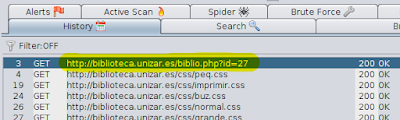
and select the news with ID 9, we can deduce that the subtraction operation is running and that the application is vulnerable. You can also make the addition operation but remember that 
sign "+"
in the URL means a blank space so it is better to use hexadecimal representation
"% 2b" well:
http://ejemplo.com/ news.php? id = 10% 2b1 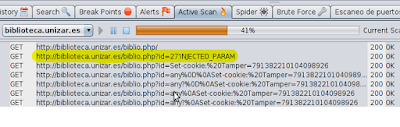
Another interesting operation is the division between zero since this operation is not mathematically defined. Example: 
http://ejemplo.com/news.php?id=10/0
 When MySQL has to operate a division by zero returns NULL and does not select any records. We can identify what happens when the web site responds with a Generic error or a message "No results were found."
 For comments
These tests can also be used to determine which form of comment is accepted and used later in the operation.
Some forms are
http://ejemplo.com/news.php?id=10--comentario
http://ejemplo.com/news.php?id=10/ * comment
http://ejemplo.com/news.php?id=10 # comment
http://ejemplo.com/news.php?id=10% 23comentario
http://ejemplo.com/news.php?cat=deportes' / * comment
http://ejemplo.com/ news.php? cat = sports '# comment
is to amend the logical result of the WHERE clause using contradictions (result is always false) or tautology (always true result) and then observe the behavior of the web and figure out if it is vulnerable.
The WHERE clause is part of the SQL statement where records are conditioned to be selected. For example:
SELECT * FROM news WHERE cat = 'Sports' AND author = 'Juan Perez'
The conditions are that the column "cat" equals "sports" and column "author" is equal "John Doe".
Imagine the way this consultation call is as follows:
http://ejemplo.com/news.php?cat=deportes&autor=Juan+Perez We can generate a tautology in this way: http://ejemplo.com/news.php?cat=deportes&autor=Juan+Perez '+ or +''='
Since the query would read:
news SELECT * FROM WHERE cat = 'Sports' AND author = 'John Doe' or''=''
The
"OR''=''" causes the result WHERE is always true. In response to this the web would show all records from the news.
This form of injection is also used to skip some login forms, putting in
password field "'or''='" . Since the same effect: SELECT * FROM users WHERE username = 'admin' AND password =''or''=''
by contradiction The test seeks to do the opposite: make the WHERE clause throws always false and therefore not selected any results. For example:
http://ejemplo.com/news.php?id=10+and+1=0
This call will take the query as follows: SELECT * FROM news WHERE id = 10 and 1 = 0
For errors
A quite simply whether we can alter the SQL query is generating a syntax error. We can accomplish this in both text and numeric fields including a simple quotation. Let's see:
http://ejemplo.com/news.php?cat = 'sports
SELECT * FROM news WHERE cat = sports'''
http://ejemplo.com/news. php? id = '10
SELECT * FROM news
WHERE id = '10 In both cases the query is malformed and see a syntax error like this:
You Have an error in your SQL syntax; check the manual That corresponds to your MySQL server version for the right syntax to use near''10 'at line 1
Though not always PHP is configured to show the errors of the database and we could see a blank page, an error page or back to an empty space .
Well, so far the second half. Maybe I'm omitting some forms of testing because of forgetfulness or ignorance. If you know any feel free to comment;)
Regards, until next time ...

Subscribe to:
Post Comments (Atom)
0 comments:
Post a Comment